![imagotype-new-chekin-landscape-2-1.png]](https://support.chekin.com/hs-fs/hubfs/imagotype-new-chekin-landscape-2-1.png?width=100&height=40&name=imagotype-new-chekin-landscape-2-1.png)
Description
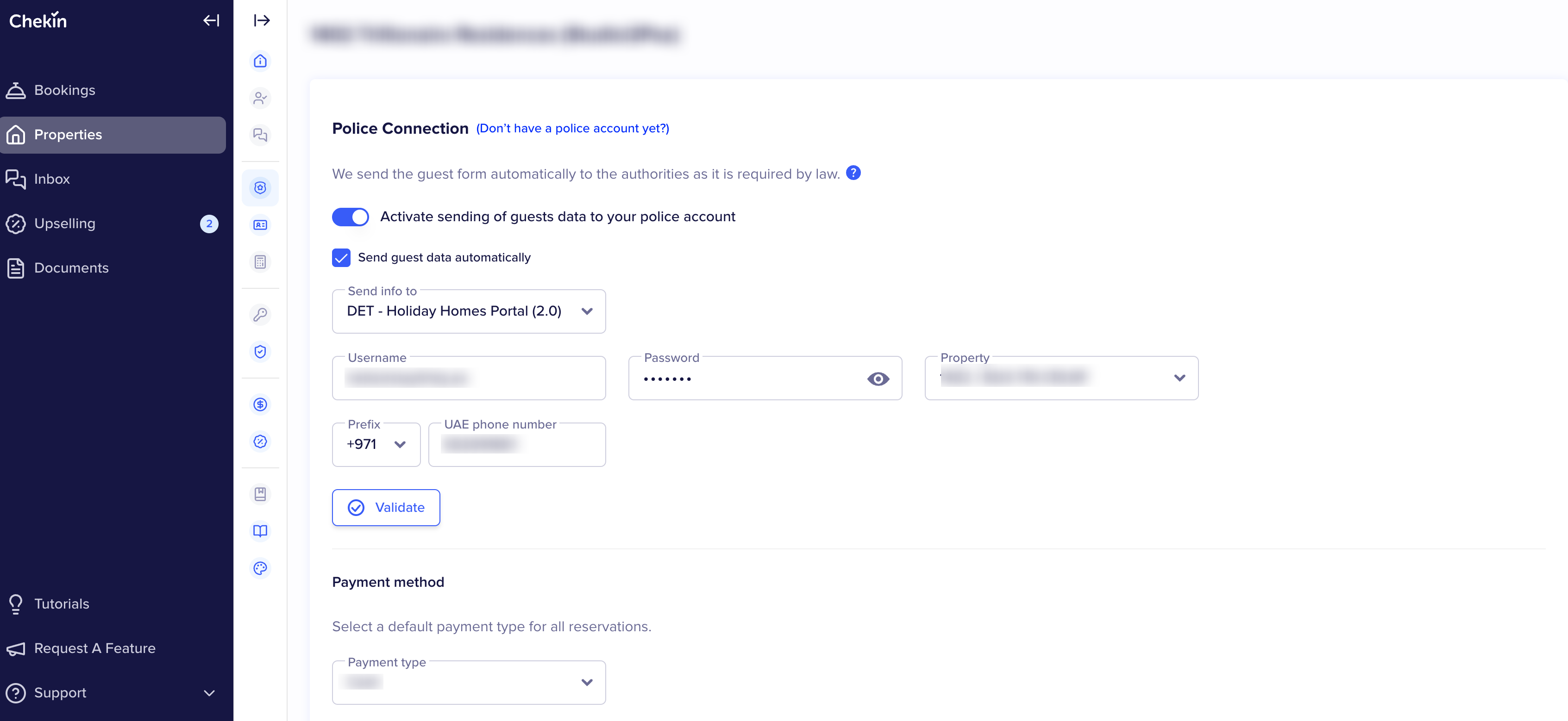
This article explains how to configure the DTCM / DET – Holiday Homes Portal (2.0) integration in Chekin, how guest data is sent to Dubai authorities, and how to troubleshoot the most common issues. Unlike EMAAR, DTCM is configured under the Police Connection section and follows a police check-in–based flow.
📍 Where the DTCM connection is configured
The DTCM connection is configured per property.
Path:
Properties → Select property → Legal → Police Connection
Each property must be configured and validated individually. There is no global police account.
⚙️ How the DTCM integration works
-
DTCM (DET – Holiday Homes Portal) is the official authority for guest police registration in Dubai.
-
Guest data is sent when a reservation is checked in.
-
One police record is created per guest.
-
All guest records belonging to the same reservation are linked together.
-
Once one guest record is accepted, the full reservation is considered registered.
🔌 How to connect a DTCM police account
-
Go to Properties and open the property.
-
Navigate to Legal → Police Connection.
-
Enable:
-
Activate sending of guests data to your police account
-
Send guest data automatically
-
-
In Send info to, select DET – Holiday Homes Portal (2.0).
-
Enter:
-
Username
-
Password
-
Property (as registered in the DET portal)
-
UAE phone number
-
-
Click Validate.
Validation confirms that the credentials and the selected property are correctly linked. If validation fails, guest data will not be sent.
🔍 How to review DTCM submissions
-
Go to Guest Registrations.
-
Filter by:
-
Stat account (DTCM / DET)
-
Check-in date (same start and end date)
-
-
Click Search.
-
Use Status check-in to review failed or completed submissions.
⚠️ Common DTCM errors and how to fix them
Validation fails
Cause
Incorrect credentials, wrong property selected, or invalid UAE phone number format.
How to fix
-
Verify the username and password in the DET portal.
-
Ensure the selected Property matches the one registered in DET.
-
Confirm the UAE phone number includes the correct country prefix.
-
Click Validate again.
Status check-in = Error
Cause
Missing or invalid guest information, or temporary DTCM system issues.
How to fix
-
Open one of the errored guest records.
-
Review the error message.
-
Correct guest details (document number, nationality, dates of birth).
-
Retry the submission.
Some guests sent, others still in error
Cause
Each guest is submitted individually, even though they belong to the same reservation.
How to fix
-
Check whether at least one guest record was successfully sent.
-
If one record is accepted, the remaining ones should complete automatically.
-
If some remain in error, retry those records.
Reservation not accepted by DTCM
Cause
The reservation is not marked as Checked in, or the check-in date is incorrect.
How to fix
-
Confirm the reservation status is Checked in.
-
Verify that the check-in date matches the guest’s actual arrival date.
Credentials stop working after initial success
Cause
The password was changed or expired in the DET system.
How to fix
-
Ask the client to verify credentials directly in the DET portal.
-
Update the credentials in Properties → Legal → Police Connection.
-
Validate again before retrying submissions.
Automatic sending is disabled
Cause
One or both police connection toggles are disabled.
How to fix
-
Go to Properties → Legal → Police Connection.
-
Ensure both Activate sending of guests data and Send guest data automatically are enabled.
✅ Best practices for DTCM
-
Always validate and save the police connection after entering or updating credentials.
-
Ensure reservations are checked in before attempting to send data.
-
Focus on same-day check-ins when troubleshooting.
🆘 When to escalate
Escalate if:
-
Validation succeeds but submissions fail repeatedly.
-
Errors persist after multiple retries.
-
The DTCM system is confirmed to be unavailable.
Provide:
-
Property ID
-
Reservation ID
-
Error message
-
Screenshots if available