![imagotype-new-chekin-landscape-2-1.png]](https://support.chekin.com/hs-fs/hubfs/imagotype-new-chekin-landscape-2-1.png?width=100&height=40&name=imagotype-new-chekin-landscape-2-1.png)
Where to see if it was sent
- Go to Bookings and find the booking. For past bookings, use the date filter, for example Last 12 months.
- In the Booking status column, look at the icons and hover over each one to see the details.
- Click Status info, on the right of the table header, to see what each icon and each colour means.
- Open the booking to see the status of each guest and, if there is an error, the reason.
The icons and their colours
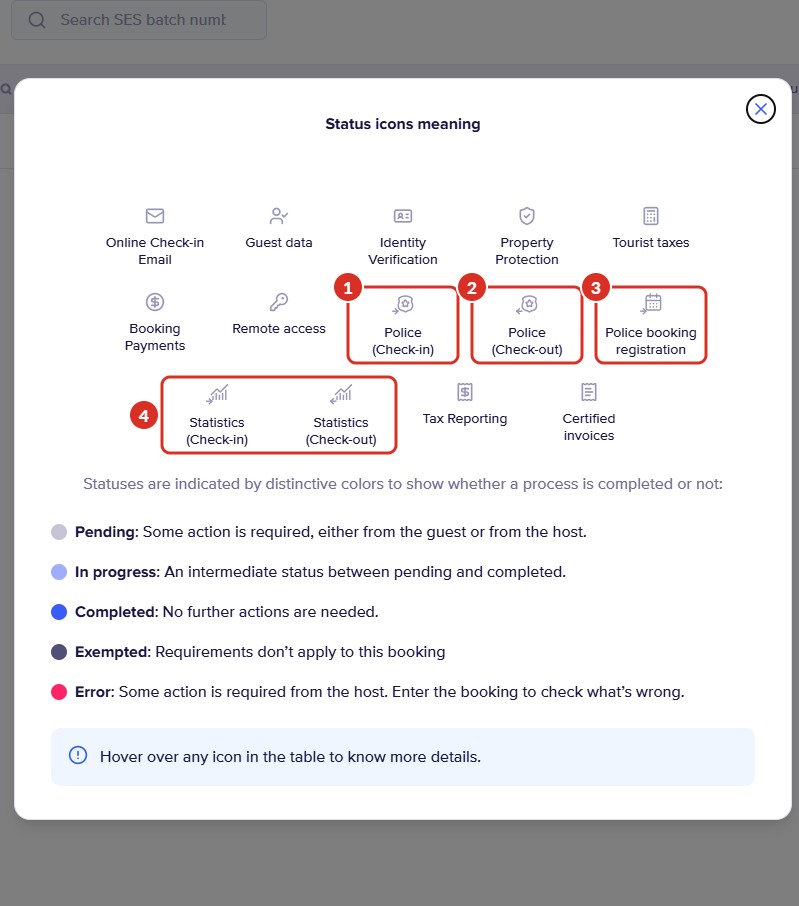
In the legend, these are the icons for submissions to the authorities. Each one is a separate submission:
- 1Police (Check-in): the guests' data on arrival (the traveller registration form).
- 2Police (Check-out): the departure, only in the countries that require it.
- 3Police booking registration: Spain only. This is the data of the booking itself, which is sent separately from the guests' data. More information in Guest Registration vs. Booking Registration.
- 4Statistics (Check-in) and Statistics (Check-out): the submission to the statistics or tourism office, if you have the Stats Connection turned on.
The colour tells you how each submission is going:
| Colour | What it means | What you need to do |
|---|---|---|
| Pending | Light grey. An action from the guest or from you is missing, or it is not yet time for the submission | Check that all the guests are registered. If they are, wait for the automatic submission on the night of the check-in day |
| In progress | Light blue. An intermediate status between pending and completed, for example when only some guests have registered | Check what is missing by hovering over the icon |
| Completed | Blue. No further action is needed | Nothing |
| Exempted | Dark grey. The requirement does not apply to this booking. For example, the Police booking registration of a booking whose source you have added in Exempted booking sources: for that booking, only the guests' data is sent | Nothing |
| Error | Red. You need to do something | Open the booking to see the reason, correct the data and send it again |
Submission statuses inside the booking
Inside the booking, the police section shows the status of the submission and the status of each guest. These are the ones you may see:
| Status | What it means | What you need to do |
|---|---|---|
| On Hold | The submission is waiting for the automatic submission on the night of the check-in day, or no guest has registered yet (for example, 0 of 4). | If guests are missing, ask them to do the check-in or register them yourself. If they are all registered, there is nothing to do |
| Scheduled | The submission is in the queue, waiting for the automatic submission | Nothing. In the meantime, the manual submission button does not appear or is greyed out |
| In progress | Chekin is processing the submission | Wait. If it is still the same after the night of the check-in day, write to us |
| Completed | Sent. No further action is needed | Nothing |
| SUCCESS and CONFIRMED | SES Hospedajes only: first SUCCESS (sent) and, when SES validates the data, CONFIRMED | Wait for CONFIRMED. With SUCCESS, SES already has the data, but reviews it over the next few hours and can still return an error. More information in SES Hospedajes: FAQ |
| Ready to send | A guest status: their registration is complete and waiting to be sent | Nothing, unless the check-in date has already passed: in that case, send it manually |
| Error | The submission has failed | Open the guest, read the message, correct the data and send it again |
| Invalid | The authority does not accept the data: a field is missing or misspelt, or the credentials are not valid. In the booking registration in Spain, the guest's full name or contact details are usually missing | Complete or correct the data and send it again |
| Expired | The deadline to send the data passed without a successful submission, for example because some data was missing or the credentials failed. Chekin stops trying automatically | In Spain and Portugal, correct the data and send it manually. In Italy the authority no longer accepts it: register it directly in Alloggiati Web (Alloggiati guide). In other countries, if you don't see the manual submission button, write to us |
How to check that the authority received it
Most authorities do not send back a receipt: in that case, what counts is the status in Chekin and, if you want to see it for yourself, the authority's portal.
| Authority | Does it send a receipt? | Where to check |
|---|---|---|
| SES Hospedajes (Spain) | No | CONFIRMED status in the booking. SUCCESS only means that SES has received the data. On the SES website, Mis comunicaciones (My communications) or Lotes (Batches) (see the steps) |
| Mossos d'Esquadra (Catalonia) | Yes | Documents > Mossos |
| Alloggiati Web (Italy) | Yes, one per account and per day with at least one guest | Documents > Alloggiati |
| UbyPort (Czech Republic) | Yes | Documents > UbyPort |
| DTCM (Dubai) | No | Status in the booking and monthly report in the DTCM portal (guide) |
| Ertzaintza, SEF, Feratel, SIRE, Stadt Zürich and ISTAT | No | Status in the booking and the authority's portal |
The Documents tabs for each authority only appear if you have that connection turned on. The details for each country are in Legal compliance per country.
Common problems
| What happens | Why | Solution |
|---|---|---|
| The booking shows as Incomplete, but the police icon is blue | Another process of the booking is missing, not the police submission | Hover over the icon that is not complete to see what is missing |
| On Hold and 0 registered guests | There is no data to send | Ask the guest to do the check-in or register them yourself |
| Everyone is registered, but it is still On Hold or Scheduled | The automatic submission takes place on the night of the check-in day | Nothing. If you want to send it earlier and the button is active, send it manually |
| The Police booking registration icon is red | The booking registration is missing the guest's full name or contact details. This happens a lot with iCal or Airbnb bookings | Add the name and the email or phone number to the booking and send the booking data (see the steps) |
| Error or Invalid on a guest | Some data is missing or wrong, or the credentials are not valid | Open the guest, correct the data and send it again |
| I registered the guests manually in the portal and Chekin still shows Incomplete | Chekin cannot see what you register outside Chekin | You don't need to do anything else in Chekin |
| In Properties it says “Failed police connection” | The credentials may be wrong or may have expired | Go to Properties > your property > Legal > Police Connection and validate it again |
| The booking is older than the police connection | The automatic submission may not pick it up | Send it manually. The date limits are in the SES and Alloggiati guides |
| I am looking for bookings with a police error and don't know which filter to use | There is one error filter for each submission: “Police (Check-in) Error” is the one for check-in submission errors | In Filters > By booking status, use it to see the bookings with an error on arrival. For departure, Police (Check-out) Error; for statistics, Stats Error |
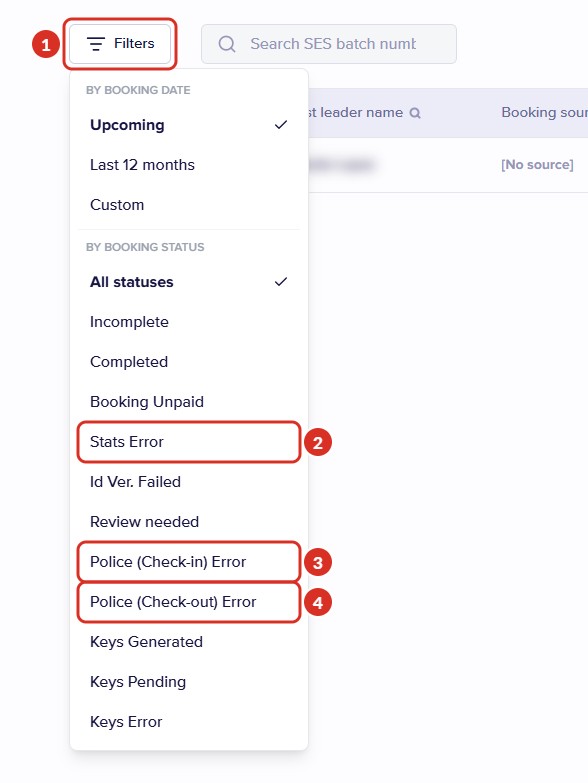
- 1Filters: opens the filters. The error filters are under By booking status.
- 2Stats Error: errors in the submission to the statistics office.
- 3Police (Check-in) Error: errors in the check-in submission.
- 4Police (Check-out) Error: errors in the check-out submission.
Still have questions? Write to us from the dashboard chat or at support@chekin.com with the property, the booking reference and a screenshot of the status, without the guests' personal data.