![imagotype-new-chekin-landscape-2-1.png]](https://support.chekin.com/hs-fs/hubfs/imagotype-new-chekin-landscape-2-1.png?width=100&height=40&name=imagotype-new-chekin-landscape-2-1.png)
What the Wallet is
The Wallet holds the money in your Chekin account: it receives your earnings from guest payments made with Chekin Payments and pays for pay-per-use services. You can find it in Settings > Billing > Overview, in the Wallet section (open in the dashboard).
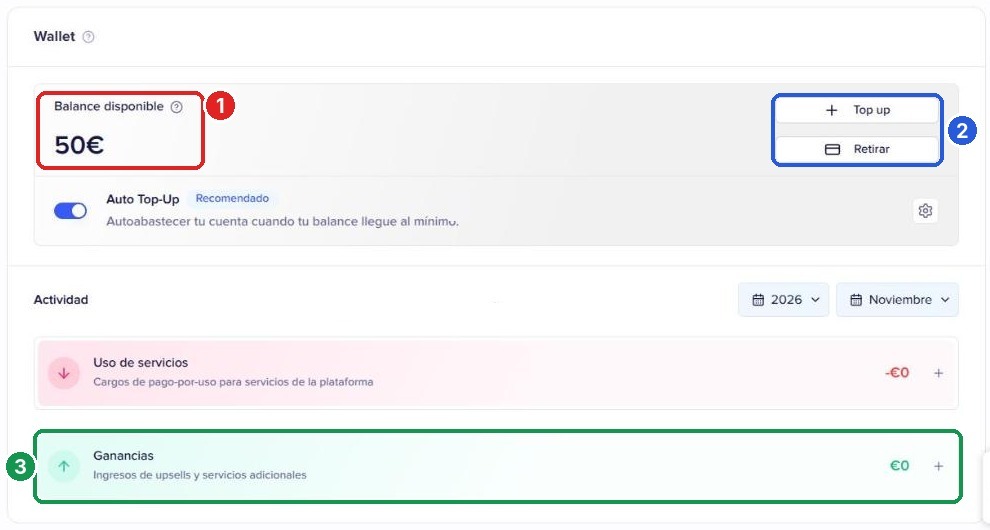
Dashboard shown in Spanish. The numbers match the list below.
- 1Available balance: what you can withdraw today.
- 2Top up and Withdraw: add funds to the Wallet or request a transfer to your bank.
- 3Activity > Earnings: the income that has come into the Wallet in the selected month. Service Usage shows what has been deducted for pay-per-use services (messages, identity verifications and liveness checks).
Which balance can I withdraw?
| Where you see it | What it shows | Can it be withdrawn? |
|---|---|---|
| Settings > Payments, “Your Balance” | The total your guests have paid through the payment gateway, including security deposits on hold and coverage costs | No, it is for information only |
| Settings > Billing > Overview, “Available balance” | Net earnings credited, minus service usage and withdrawals already made | Yes |
What counts as earnings and what doesn't
Only money that is definitively yours goes into Earnings, with fees already deducted. Security deposits and the cost of damage protection are not earnings.
| Item | Does it go into the Wallet? | Why |
|---|---|---|
| Booking payment | Yes, net | It is the amount the guest pays you for the stay |
| Tourist tax | Yes, net | You collect it, and you are the one who declares it and pays it to the authorities |
| Extra services (upsells) and third-party services | Yes, net | They are your own sales during online check-in |
| Security deposit | No | It is a hold on the guest's card, not a charge. With Chekin Gateway it is a single hold of up to 30 days, with no renewals, and it is released if there is no damage |
| Damage protection | No, except your margin | The guest pays the cost of the coverage and that amount goes to the insurer. Only the margin you have added in the Damage Protection Program settings goes into the Wallet |
| Payments with your own Stripe account | No | They go straight to your Stripe account, and Stripe transfers them to your bank on its own schedule. Chekin cannot move that money |
How to add your bank details and withdraw
To withdraw, you only need one thing entered correctly: the full IBAN in the Account number field. Your bank details are not in “Account details”: you add them from the Withdraw button in the Wallet.
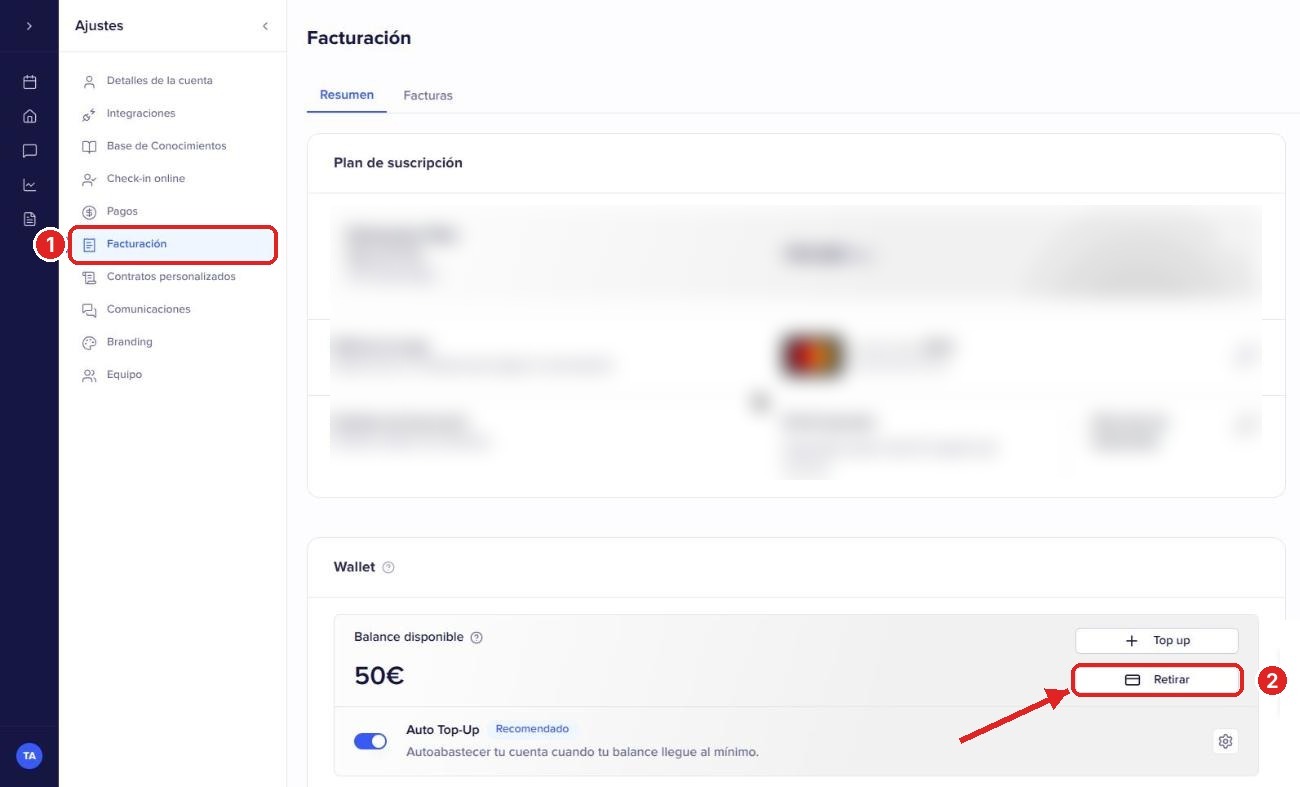
Dashboard shown in Spanish. The numbers match the steps below.
- Go to Settings > Billing > Overview (open in the dashboard).
- In the Wallet section, click Withdraw.
- First time: the Add payout details window opens. If you already have saved details: the Balance Withdrawal window opens; in the Payment settings box you will see your current details and a pencil icon to edit them (Edit payout details window).
- Fill in the four fields:
- 1Country: the country of your bank.
- 2Beneficiary name: the account holder, exactly as shown by the bank.
- 3Bank name: for example, Intesa Sanpaolo or CaixaBank.
- 4Account number: the full IBAN, without spaces. It starts with the country code (IT, ES, FR...) and has a fixed length: Italy 27 characters, Spain 24, France 27, Portugal 25, Germany 22, Czech Republic 24.
- Click Save 5. We will send you a verification code by email: enter it in the Verify your identity window.
- Enter the amount in Amount to withdraw and confirm. You will see the message “Withdrawal request submitted successfully”.
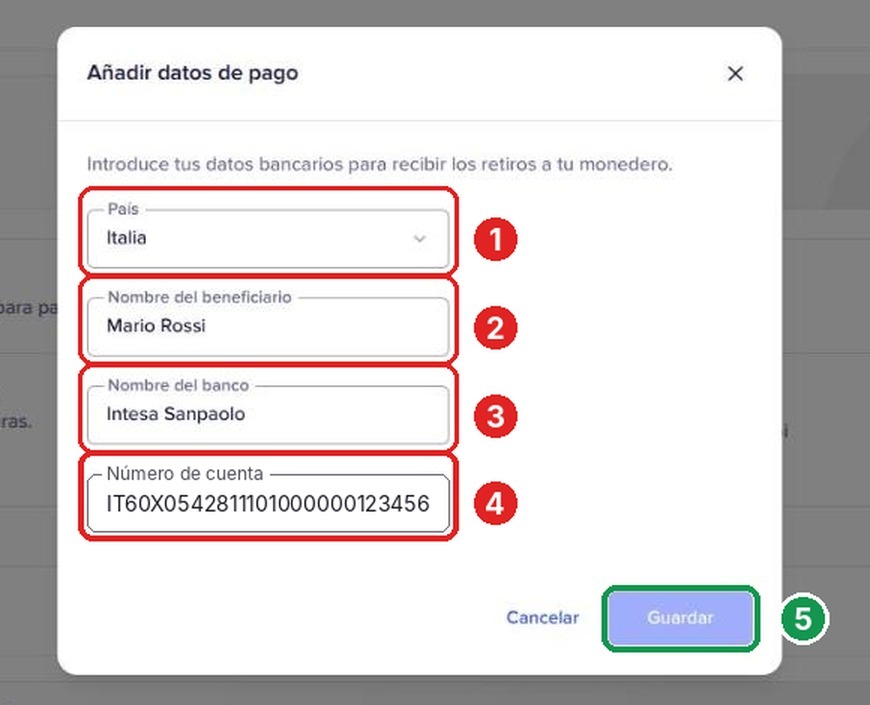
Dashboard shown in Spanish. The numbers match the fields in step 4 and the button in step 5.
Withdrawal statuses and timing
Once approved, the money takes 1-5 business days to reach your bank, because of bank transfer times. Withdrawals are reviewed and paid manually, on working days.
| Status | What it means | What you need to do |
|---|---|---|
| Pending | We have received your request and our team is reviewing it | Nothing, just wait for the review |
| Approved | The request is correct and the transfer is being processed manually | Nothing. Allow 1-5 business days from approval |
| Completed | The transfer has been sent to your bank | If you do not see it within 1-5 business days, write to us with the amount and the date |
| Rejected | We could not pay out with the details provided, almost always because of an incorrect IBAN. The amount goes back to your Available balance | Correct your bank details and request the withdrawal again |
| Failed | The bank returned the transfer or there was an error sending it. The amount goes back to your Available balance | Check your details and try again, or write to us |
Common errors and questions
Most rejected withdrawals are caused by a mistyped IBAN; the rest of the questions come from confusion between amounts.
| What happens | Why | Solution |
|---|---|---|
| My withdrawal was rejected | Account number contains a national account number, or an IBAN that is incomplete, has a wrong digit or belongs to another country | Edit your details with the full IBAN (see the previous section) and request the withdrawal again. The money is still in your Wallet |
| I can't find where to enter my bank details | They are not in Account details or in Payments | Billing > Overview > Wallet > Withdraw |
| I see more money in Payments than in the Wallet | “Your Balance” in Payments adds up everything collected, including deposits and coverage costs | What you can withdraw is the Available balance in the Wallet |
| The security deposit does not appear in my earnings | It is a hold that is released back to the guest if there is no damage | You only collect the deposit if there is damage and you capture it |
| I turned on damage protection and I don't see the money | The cost of the coverage goes to the insurer | Add a margin in the Damage Protection Program settings if you want to earn from it |
| I use my own Stripe account and the Wallet is empty | The payments go straight to Stripe | Check the payments and transfers in your Stripe dashboard |
| My balance went down without a withdrawal | Pay-per-use services were deducted (messages, verifications) | Check it in Activity > Service Usage |
| The withdrawal is approved and still hasn't arrived | Transfers take 1-5 business days from approval | Wait for that period; if it has passed, write to us with the amount and the date |
| I'm not receiving the verification code | It is sent to the email address of your Chekin account | Check your spam folder or click Resend code |
Still have questions? Write to us from the dashboard chat, including the amount and the date of the withdrawal.