Trento DTU Integration
How to activate Trento DTU on Chekin
What you need from ISTAT Alloggi
ISTAT Alloggi web-service connections use CIPAT placing it in connecting form.
The official Softwarehouse form states that these credentials are issued for activation of the web service necessary to transmit data to the ISTAT Alloggi application. (Provincia autonoma di Trento)

How to Request Web Service Credentials
The credentials (Username and Password) are issued by ISPAT upon request.
Procedure:
- Download the Softwarehouse form from the “Istat Alloggi – User Materials” section of the Province website
- Fill it out with your details and a valid email address for communications
- Sign it and send it via certified email (PEC) to ispat@pec.provincia.tn.it
- ISPAT will issue the credentials required for activation
Once you receive them, you must link your properties to the selected software directly within the ISTAT Alloggi interface: Import → software → select the provider → enter the CIPAT codes → click Update. The list only includes software providers accredited by the Province.
Where to get the values from ISTAT Alloggi
If you do not already have ISTAT Alloggi web-service credentials, request them from ISPAT using the Softwarehouse form published in the Istat Alloggi - Materiale utenza section. That form explicitly requests the release of Username/password, asks for a valid email address for communications, and says the signed form must be sent by PEC to ispat@pec.provincia.tn.it.
How the connection is used in ISTAT Alloggi
After web-service access is set up, the user must also link their accommodation(s) to the chosen software provider inside ISTAT Alloggi. Users who want to send ISTAT data automatically through management software must associate their accommodation(s) with the selected software house; in the interface they go to Import → software, choose the software house from the dropdown, select the relevant CIPAT code(s), and click Update. Only accredited software providers appear in that list, chose “Chekin” and click Save.
What this means for this integration
This connection needs only your CIPAT. The accommodation mapping itself is handled inside ISTAT Alloggi through the software house + CIPAT association step, rather than by entering a separate Property ID in this form. This last point is an inference from the official setup flow described above.
What You Need from ISTAT Alloggi
To configure the connection to the ISTAT Alloggi web service, you need two credentials:
-
Username
-
Password
The official form dedicated to software companies specifies that these credentials are issued for the activation of the web service required for data transmission to the ISTAT Alloggi application.
Important
For the standard submission of declarations, the Province states that access to the service normally takes place through the DTU portal, using SPID, CPS, CNS, or eIDAS, and then selecting SERVICES → ISTAT declaration.
The Username and Password credentials, however, represent a separate access method used by ISPAT in specific cases and for the activation of the web service. Therefore, if the connection form only requires Username and Password, you must enter the credentials issued by ISTAT Alloggi / ISPAT, and not the ones used to log in with SPID or CPS.
Where to Find the Values in ISTAT Alloggi
If you do not yet have the ISTAT Alloggi web service credentials, you must request them from ISPAT using the Softwarehouse form published in the Istat Alloggi - User Materials section.
The form explicitly requests the issuance of Username/password credentials, together with a valid email address for communications. Once completed and signed, the form must be sent via certified email (PEC) to ispat@pec.provincia.tn.it.
How to Enter Them in This Connection Form
-
Enter your ISTAT Alloggi Username in the Username field.
-
Enter your ISTAT Alloggi Password in the Password field.
-
Save the connection.
How the Connection Is Used in ISTAT Alloggi
After the web service access has been activated, the user must also associate their property with the selected software directly within ISTAT Alloggi.
Users who wish to automatically transmit ISTAT data through management software must associate their property with the selected software company. To do this, in the ISTAT Alloggi interface they must go to Import → software, choose the software company from the dropdown menu, select the relevant CIPAT codes, and click Update.
Only accredited software providers are visible in the list.
What This Means for This Integration
Only Username and Password are required for this integration.
The property association is not managed through a Property ID entered in this form, but directly within ISTAT Alloggi through the association process between the software company and the CIPAT codes.
Configuration on Chekin
Click on properties-legal
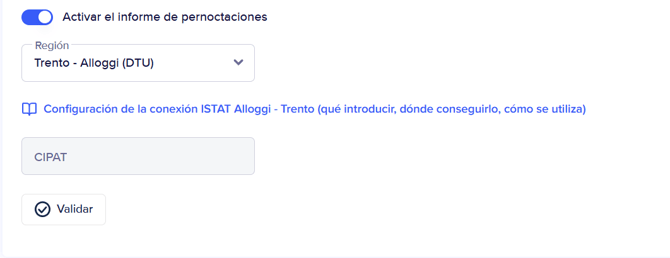
add your CIPAT number and click on validate.
If you need any information please contact our support team at support@chekin.com