![imagotype-new-chekin-landscape-2-1.png]](https://support.chekin.com/hs-fs/hubfs/imagotype-new-chekin-landscape-2-1.png?width=100&height=40&name=imagotype-new-chekin-landscape-2-1.png)
Who this guide is for
This guide applies to Italian properties issuing electronic invoices via SDI, using Chekin.
What is e-Invoicing in Italy?
Italian e-invoicing requires invoices to be:
-
Generated in a structured format
-
Sent via SDI
-
Stored according to legal archiving rules
Chekin integrates invoicing directly into your booking workflow.
STEP 1 — Prepare your property
-
Connect PMS
-
Sync properties
-
Turn on Payments
-
Create Supplier
-
Sync bookings
-
Go to Housing → Invoice settings
-
Sync items
STEP 2 — Supplier configuration (Italy)
Required fields
-
Supplier name
-
VAT number
-
Default VAT rate
-
Payment method
-
Full address
Italy-specific field
-
Legal storage email
-
Used for SDI and storage notifications
-
STEP 3 — Invoice numbering
Configure series + start number for:
-
Invoices
-
Credit notes
-
Receipts
-
Retail credit notes
STEP 4 — Sending rules
Choose:
-
Manual sending, or
-
Automatic:
-
Per booking
-
Monthly bulk
-
STEP 5 — Items & optional adjustments
Items
Items represent invoice amounts (accommodation, fees, extras).
Optional: Commission rules
Use commission rules to:
-
Extract OTA commissions
-
Handle VAT-inclusive pricing
⚠️ Best practice: use either Commission Rules or complex formula logic, not both.
STEP 6 — Review & access
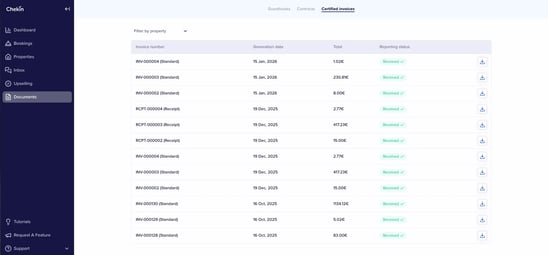
Invoices are available:
-
At booking level
-
In Documents
-
Downloadable as official PDFs
Final note
Chekin’s e-invoicing is designed to:
-
Match official legal frameworks
-
Scale from small hosts to enterprise operators
-
Reduce accountant back-and-forth
-
Make compliance invisible